Text messages
Stay in Touch (sit-app.com) is a personal relationship app. This page explains every text message we send, who gets it, and how you stop it. There are two kinds, and they work differently. Account texts are a sign-in code, or a heads-up that someone wrote to you. They go only to people who made an account, entered their own mobile number, proved they own it with a one-time code, and checked a box to turn them on. A note or invitation a member sends you arrives because that member wrote to you, and it is named for them. Those messages stay about the specific note or plan you were sent, and they are never promotional.
Neither one uses purchased, rented, or third-party lists. Ever. Every message says “Stay in Touch” and tells you how to stop, and replying STOP stops all of it.
Account texts: what we send
Account texts are two things, and they have different triggers:
- a brief heads-up when someone sends you a note, with a secure sit-app.com link to read and reply. These are recurring, and they are sent only if you turn them on with the opt-in below, and
- your one-time sign-in code. Codes are not a subscription: one is sent only at the moment you request it, by choosing to sign in with your phone number.
That is all. We do not send marketing or promotional texts of any kind.
Account texts: who receives them
Only the account holder who turned them on. The person who consents is always the same person who receives them. Your number enters this program only when you type it into the app and verify it with a code we send to that number. We never send account texts to a number that came from a contact import, from another person, or from any purchased, rented, or third-party list.
Account texts: how you opt in
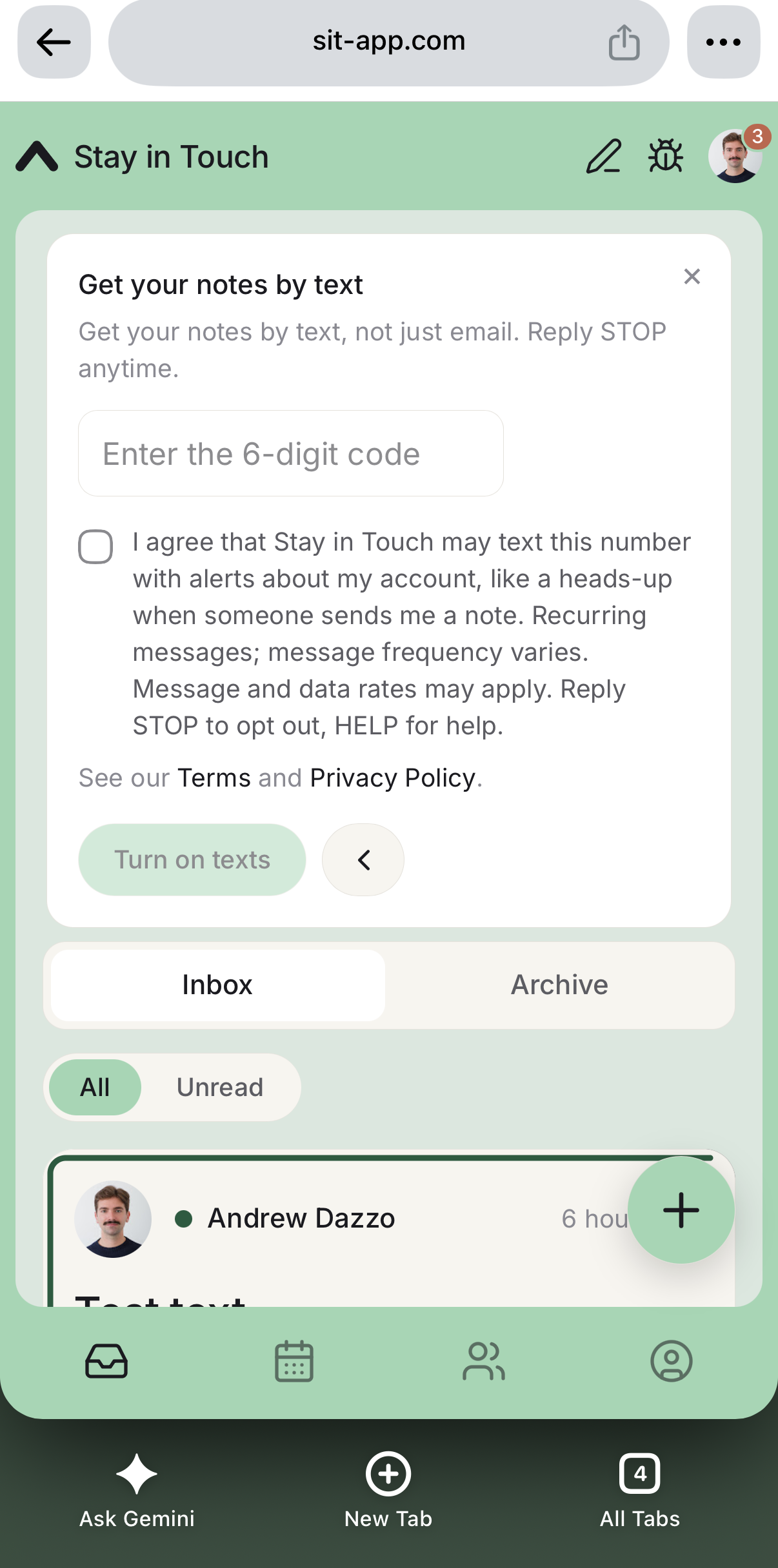
Opt-in happens inside the Stay in Touch app, after you sign in. It is offered in Settings → Text messages, as a prompt after you sign in, and on a dedicated step right after you connect your contacts. In every place, the steps are the same:
- You enter your own mobile number.
- We text a one-time code to that number.
- You enter the code, which proves the number is yours.
- You check a separate box — off by default, never pre-checked — that reads, word for word:
I agree that Stay in Touch may text this number with alerts about my account, like a heads-up when someone sends me a note. Recurring messages; message frequency varies. Message and data rates may apply. Reply STOP to opt out, HELP for help.
Turning texts on is optional. You can use Stay in Touch fully without it, and you are never required to provide a phone number to create an account or to use any feature.
Getting a note or invitation by text
Someone you know can send you a note, or an invitation to get together, through Stay in Touch. If they have your mobile number in their own contacts, we deliver that message, and it says who it is from. It carries a link to read the note and reply. And it works in both directions: when someone answers a note or invitation you sent, we deliver their reply back to you the same way.
These messages stay about the specific thing you were sent. A note is a single delivery, with at most one reminder if it goes unanswered. An invitation is the invitation and updates about that event only: a change of time or place, a reminder before it, or a cancellation. Nothing promotional, and nothing unrelated to what you were sent. Message frequency varies. We deliver these over RCS, so they arrive from Stay in Touch rather than an unknown number. If your phone cannot receive them, we use email instead.
Reply STOP and we stop. That covers every member and every channel, not only the person who wrote to you, and we keep a record of the request.
Anything beyond messages about the thing you were sent, you ask for. Sign-in codes and alerts when someone writes to you are the separate program described above: they go only to people who make an account, verify their own number, and switch them on.
Message frequency and rates
Message frequency varies. An account text is sent only when someone sends you a note, or when you request a sign-in code. A note or invitation is sent only when a member writes to you, and an update about an invitation only when that plan changes, has a reminder coming due, or is called off. If a note goes unanswered, you may receive at most one reminder about it, never more than one per note. A reply notification is sent only when someone answers a note or invitation you sent. Message and data rates may apply.
How to stop
Reply STOP to any message to stop receiving them, or HELP for help. You can also turn account texts off at any time in Settings → Text messages inside the app. If you opt out, we stop messaging that number. That covers every member and both programs.
Privacy
We do not sell, rent, or share mobile phone numbers, or any SMS opt-in or consent information, with third parties or affiliates for their own marketing or promotional purposes. For the full details, see our Privacy Policy and Terms of Service.
Contact
Questions about our text-message program? Write to hi@sit-app.com.
Last updated: 2026-08-26